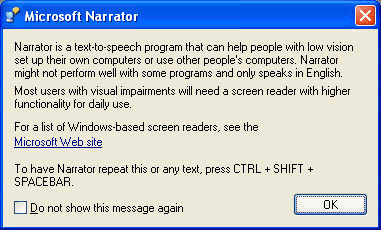
Let’s say, hypothetically, you have a fresh copy of Windows XP that’s installed on a machine, after 30 days it will force you to activate (yes, there are commands you can enter in safe mode to reset this, but only up to three times iirc). This comes up as soon you log in, and it only presents you with three options; activate over the internet, activate via telephone, or log out.
Again hypothetically, say you have a particular program than can help out with the activation issue, but with the above situation it may appear there is no way to access to be able to run it!
Figured out a way around it - press Windows-U to bring up the Narrator, click the “Microsoft Web site” link, then in the browser address bar enter the drive letter for the thumb drive (e.g. “D:\"), you can then see the contents of the USB thumb drive, and run that program. You then just have Windows restart, and all resolved :)